


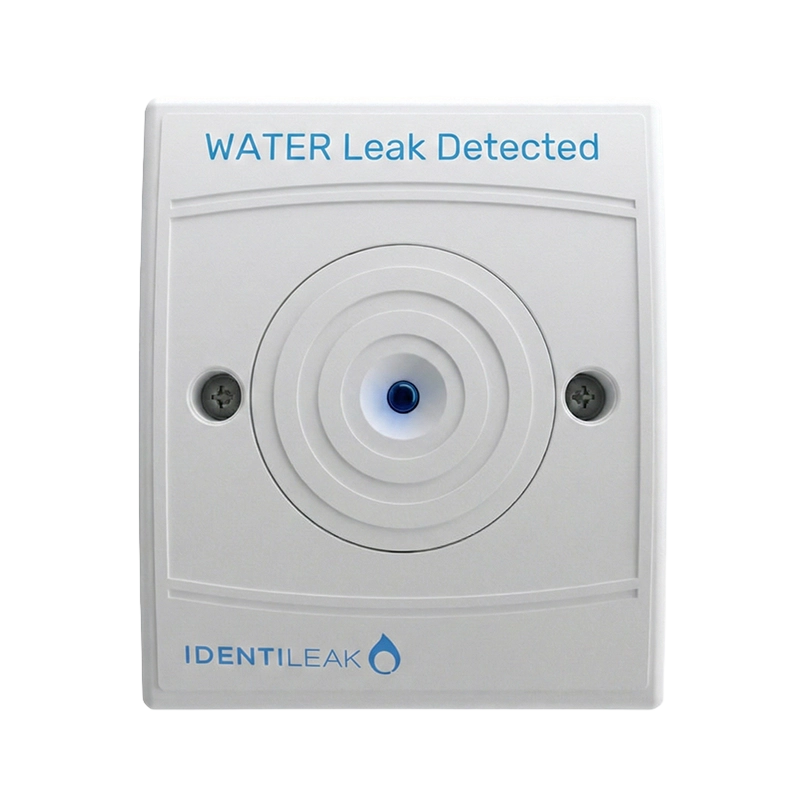
Identi-Leak Remote Indicator
Summary
The Vimpex Identileak Remote Indicator provides essential local visual status indication for water leak detection systems, enabling rapid identification of leak locations without accessing the main control panel. Designed for installation outside monitored areas such as plant rooms, server rooms, comms spaces and equipment enclosures, the remote indicator features a high-visibility bright blue LED that illuminates during alarm or fault conditions, ensuring immediate awareness of water escape events.
Fully compatible with Identileak cable and probe detection interfaces, the remote indicator connects directly to the interface unit to provide repeater indication in accessible locations such as corridors, building management areas or outside locked rooms. The distinctive bright blue LED colour differentiates water leak alarms from other building systems, reducing confusion during emergency response and improving reaction times when water damage prevention is critical.
Available in both flush-mounted and surface-mounted configurations, the Identileak Remote Indicator offers flexible installation options to suit different architectural requirements and aesthetic preferences. The compact, low-profile design ensures discreet integration into building environments while maintaining clear visibility of alarm status. Easy indication of leak location combined with simple wiring connections makes the remote indicator an essential component for comprehensive water leak protection systems across residential, commercial and industrial applications.
Features
- Bright blue LED provides high-visibility alarm indication
- Compatible with Identileak cable and probe interfaces
- Flush or surface mount installation options available
- Easy indication of leak location for rapid response
- Designed for installation outside monitored areas
- Ideal for corridors, plant rooms and building management areas
- Low-profile compact design for discreet integration
- Distinctive blue colour differentiates from other building alarms
- Simple wiring connections for straightforward installation
- Enhances local awareness without accessing main control panel
- Improves response times in leak-critical environments
- Suitable for use in server rooms, comms spaces and equipment areas
- Professional specification for commercial and industrial applications
- Compatible with full Identileak system range
- Manufactured in the UK by Vimpex
FAQs
Where should the remote indicator be installed?
The Identileak Remote Indicator should be mounted outside the monitored area in an accessible, visible location such as corridors, outside plant room doors, in building management areas, or adjacent to server room entrances. This allows personnel to immediately identify which zone has detected water without entering the protected space or accessing the main control panel, improving response times during water escape events.
What is the difference between the remote indicator and the detection interface?
The detection interface (IL-INT-F, IL-INT-S, IL-INT-DBB) connects directly to the detection cable or probes and provides both connection to the control panel and local indication at the detection point. The remote indicator (IL-RI) connects to the interface’s remote indicator output to provide repeater indication in a separate, more accessible location. One interface can support both local indication and a remote indicator simultaneously.
Can I use multiple remote indicators with one interface?
The remote indicator output from each Identileak interface is designed to drive one remote indicator unit. If multiple indication points are required for a single detection zone, this would typically be achieved through the control panel’s auxiliary relay outputs or by using multiple interfaces distributed across the detection zone, each with its own remote indicator.
What does the bright blue LED indicate?
The bright blue LED illuminates when the connected detection interface enters an alarm or fault condition, indicating that water has been detected by the cable or probe connected to that interface. The distinctive blue colour helps differentiate water leak alarms from fire alarms (typically red) or other building systems, reducing confusion during emergency response and ensuring appropriate action is taken.
Is the remote indicator suitable for outdoor installation?
The Identileak Remote Indicator is designed for indoor installation in dry locations. While it can indicate the status of outdoor detection systems, the indicator unit itself should be mounted indoors in protected areas. For outdoor visible indication requirements, the unit should be installed inside a suitable weatherproof enclosure with appropriate IP rating for the environment.
Does the remote indicator require separate power?
No, the remote indicator is powered directly from the detection interface unit to which it connects. The interface receives power from the main Identileak control panel, which in turn is powered by mains supply with battery backup. This ensures the remote indicator continues to function during mains power failures when the system is operating on battery backup.
What mounting options are available?
The Identileak Remote Indicator is available in both flush-mounted and surface-mounted versions. Flush mounting provides a low-profile installation that sits flush with the wall surface for a neat, integrated appearance. Surface mounting allows quicker installation on wall surfaces without cutting into the wall structure, ideal for retrofit applications or where flush mounting is impractical.
Can the remote indicator be used with both Mini and conventional Identileak panels?
Yes, the remote indicator is fully compatible with all Identileak control panels including the Mini range (IL-MINI-2) and conventional range (IL-CONV-2, IL-CONV-4, IL-CONV-8). The remote indicator connects to the detection interface rather than directly to the panel, so compatibility is determined by the interface type rather than the panel model, ensuring consistent functionality across the entire Identileak product family.
How does the remote indicator improve system effectiveness?
Remote indicators significantly improve system effectiveness by providing immediate visible indication of water detection in accessible, high-traffic areas where staff are more likely to notice the alarm quickly. This is particularly valuable when detection points are in locked rooms, ceiling voids, raised floors or other areas not regularly accessed. The remote indicator eliminates the need to check the main control panel location to identify which zone is in alarm, reducing response times and minimizing potential water damage.
Is there a version with audible alarm capability?
Yes, the IL-RIB version includes both the bright blue LED visual indicator and an integrated buzzer for audible alarm notification. This dual indication provides enhanced warning in areas where visual indicators alone may not be sufficient, such as noisy environments, areas with limited visibility, or locations where staff may not have direct line of sight to the indicator. The audible/visual combination ensures alarms are noticed quickly regardless of environmental conditions.
Specifications
- Product Code: IL-RI (visual only), IL-RIB (visual with buzzer)
- Indication Type: Bright blue LED
- LED Colour: Blue (water leak identification)
- Mounting Options: Flush mount or surface mount
- Power Supply: Powered from detection interface unit
- Compatibility: Works with Identileak cable and probe interfaces (IL-INT-F, IL-INT-S, IL-INT-DBB)
- Connection: Connects to remote indicator output on detection interface
- Indication Conditions: Alarm and fault status
- Installation Location: Outside monitored areas (corridors, plant rooms, management areas)
- Design: Compact, low-profile construction
- Application: Indoor use only
- System Compatibility: Compatible with all Identileak control panels (Mini and conventional range)
- Purpose: Local visual status indication for rapid leak location identification
- Manufacturer: Vimpex Ltd, UK
Downloads
- Datasheet (Adobe PDF)
Additional information
| Buzzer | Yes, No |
|---|---|
| Device Type |