


Advanced TouchControl | 10″ Touchscreen Remote Control Terminal | Active Maps & Zone Plans
Summary
The Advanced TouchControl is a 10″ high-resolution touch screen remote control terminal that functions as both a fire panel and network node in its own right. Working seamlessly with Advanced’s MxPro and Axis EN fire panels, it operates on both standard and fault tolerant networks, providing comprehensive control and monitoring capabilities throughout your facility.
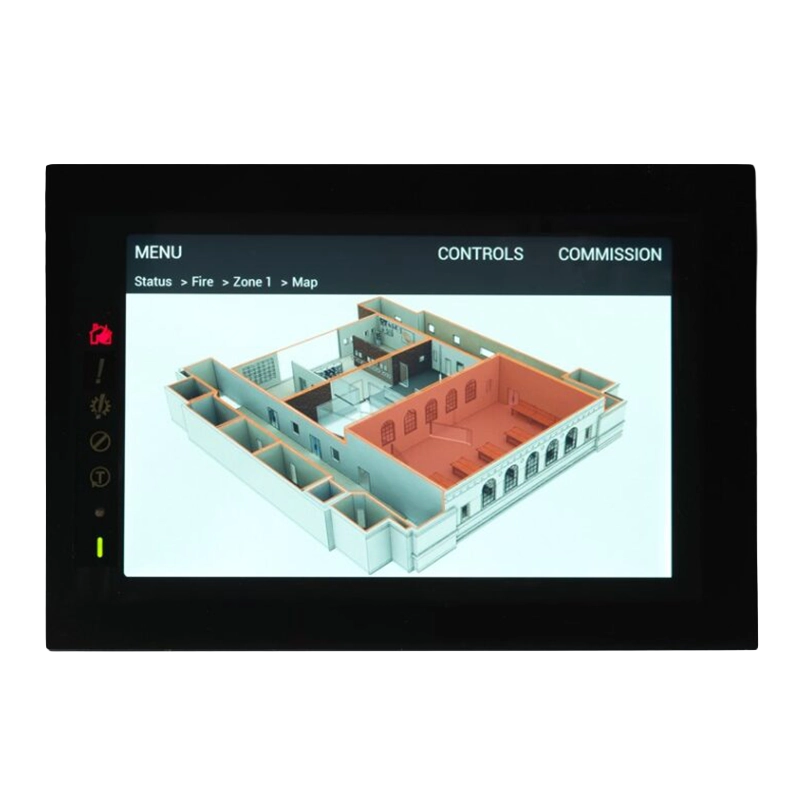
Zone information is presented through an intuitive, colour-coded interface and active maps configured using the Dynamix Tools Map App. Users can perform all critical fire system operations including evacuate, mute, silence, resound and reset functions, whilst accessing detailed information through instant filters for fires, faults, disablements, alarms, inputs, outputs, supervisory conditions and network status. The terminal displays zone and device status, enables walk test mode, and maintains comprehensive event logging with 1,000 general events and 500 fire-specific events.
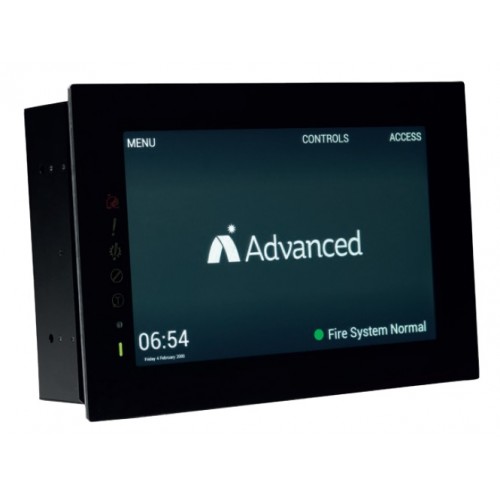
The TouchControl features a two-part enclosure for straightforward first fix and slide-in installation, with a low-profile bezel for flush fitting. The 1280×800 resolution screen is designed to work with fireman’s gloves, whilst dedicated status indicators provide at-a-glance system information for fire, fault, system fault, disabled, test and power conditions. Users can customise the display with background images or upload their own, and run presentations that automatically default to normal operation when fire conditions occur or the screen is touched, making it ideal for enhancing public areas whilst providing essential control and oversight.
Features
- 2 part enclosure for easy first fix and slide-in installation
- 1280×800 (720p) high resolution screen designed to work with fireman’s glove
- ‘At a glance’ system status to immediately identify zones and devices in fire, test, supervisory and fault conditions
- Interactive site maps and zone plans capability built-in
- Monitored external input for external PSU faults
- Two-core connection to the network (fault tolerant or standard)
- Low-profile bezel for flush fitting
- Customisable background images with option to add personalised images
- Low profile installation
- Dedicated status indicators for fire, fault, system fault, disabled, test and power
- Zone plan display capability – essential part of BS5839-1 compliance
- Dual power supply inputs independently monitored for redundant power feeds
- View fires, faults, disablements, alarms, inputs, outputs, supervisory and network via ‘instant filters’
- View, enable and disable zones and devices
- Enable and disable outputs by type
- Enable walk test mode
- Test display, zones, outputs, buzzer and LEDs
- Quick access to all zones in fire, fault, disablement and test conditions via ‘instant filters’
- 1,000 general event log and 500 fire event log capacity
- Set network time and date functionality
- Compatible with MxPro and Axis EN fire panels
- Supports up to 2000 fire zones when networked
- EN54-13:2005 Type 1 certified remote control and indicating equipment
Video
What is TouchControl from Advanced?
TouchControl is a sleek and versatile remote control terminal and repeater with a 10 inch high resolution touchscreen for fire system monitoring.
What size is the touchscreen on the TouchControl?
The touchscreen on the TouchControl is 10 inches.
What fire panels is TouchControl compatible with?
TouchControl is compatible with MX-PRO5 and AXS EN panels.
How does TouchControl help save time and cost?
TouchControl can be included anywhere on the fire network, saving time and cost by avoiding the installation of extra fire panels.
Where is TouchControl ideal for use?
TouchControl is ideal for use in public areas.
What can TouchControl display when in standby mode?
In standby mode, TouchControl can display company branding, adverts, presentations, or notices.
How does TouchControl respond when the screen is touched or a fire condition occurs?
The display instantly reverts to fire operation as soon as the screen is touched or a fire condition occurs.
What are the installation features of TouchControl?
TouchControl features a two-part enclosure with a metal chassis for easy wall mounting or recessing, pluggable terminals for easy cable attachment, and a touchscreen unit that slides into place with minimal wiring.
How is TouchControl set up after installation?
After installation, TouchControl is given a valid network node address to become fully operational and can be set up at the panel or on a PC using Dynamics Tools software.
FAQs
What fire panels is the TouchControl compatible with?
The TouchControl is compatible with Advanced’s MxPro and Axis EN fire panels. It works as both a remote control terminal and a network node within Advanced’s standard and fault tolerant networks.
Can the TouchControl operate on both standard and fault tolerant networks?
Yes, the TouchControl is available in two versions: TOUCH-10 for standard networks (up to 32 nodes) and TOUCH-10/FT for fault tolerant networks (up to 200 nodes). The fault tolerant version creates a ring topology for enhanced system resilience.
What access levels are available on the TouchControl?
The TouchControl provides four access levels: Level 1 for untrained users (view and mute only), Level 2 for authorised users (with up to 10 configurable user IDs and varying permissions), Level 3 for service engineers (programming and configuration), and Level 4 for advanced service functions requiring special tools.
Can I view building maps on the TouchControl?
Yes, the TouchControl has built-in capability for interactive site maps and zone plans configured using the Dynamix Tools Map App. Maps are stored on an SD memory card and can show multiple levels of detail, highlighting zones in fire or fault conditions with colour coding. Users can navigate through building levels and floor plans by touching highlighted areas.
How is the TouchControl powered?
The TouchControl requires a 24V DC supply from an EN54-4 certified PSE (Power Supply Equipment). It supports dual redundant power feeds with independent monitoring of each feed, meeting EN54-4 requirements for separate cabinet installations. The unit also includes a monitored input for external PSE fault conditions.
What installation options are available?
The TouchControl is designed for flush mounting into stud walling with a two-part enclosure system for easy first fix installation. A surface mount back box (TOUCH-10-SBB) is available as an optional accessory for surface mounting applications. The unit features a low-profile bezel and multiple cable entry knockouts.
How do I update the TouchControl software or configuration?
Software updates and configuration changes are performed via the USB-B connector using Advanced’s MX-Flasher program for firmware updates and MX-CONFIG Tool for configuration files. The panel must be placed in Level 3 access mode to perform these operations.
Can the background image be customised?
Yes, users can choose from five pre-set background images or upload their own custom images. Multiple images can be configured as a slideshow with adjustable intervals. The display also supports custom logos and adjustable transparency levels for on-screen buttons.
Is the touchscreen suitable for use with gloves?
Yes, the resistive touchscreen is specifically designed to work with fireman’s gloves, ensuring the panel remains fully operational during emergency situations when personnel are wearing protective equipment.
What certifications does the TouchControl hold?
The TouchControl is certified to EN54-13:2005 as Type 1 Component – Remote control and indicating equipment. It also complies with the Low Voltage Directive 2006/95/EC (BS EN60950-1:2006) and EMC Directive 2004/108/EC (BS EN55022:2010 Class B emissions and BS EN50130-4:2011 immunity).
Specifications
- Part Numbers: TOUCH-10 (Standard Network), TOUCH-10/FT (Fault Tolerant Network)
- Display Type: 10″ Colour TFT touchscreen
- Display Resolution: 1280×800 (720p)
- Touch Technology: Resistive (full screen)
- Enclosure Material: Steel IP30 RAL9005
- Dimensions (H x W x D): 205 x 290 x 85mm
- Weight: 3kg
- Environment: Indoor, Dry
- Operating Temperature: -5°C to +40°C
- Relative Humidity: 95% Max
- Supply Voltage: 18-30V DC
- Supply Current: 330mA @ 24V (Standard), 365mA @ 24V (Fault Tolerant)
- PCB Fuse: T250H1.6A
- PSE Fault Monitoring: EOL 3300Ω, ACT 680Ω
- Wire Gauge (Max): 2.5mm²
- Cable Entries: 5 x 20mm knockouts (top), 5 x 20mm knockouts (rear)
- Number Of Fire Zones: 2000 when networked
- Network Type: STD (ST4) or FT (ST7)
- Status Indicators: Fire, Fault, System Fault, Disabled, Test, Power On
- Programmable Inputs: 1 x hardwired input (default PSE fault input)
- USB Interfaces: USB Type A (future use), USB Type B for PC connection
- TCP/IP Interface: On-board provision for 10BaseT connection (future use)
- Event Log Capacity: 5000 Event & Diagnostic + 500 Fire
- Backlight Control: Automatic brightness control with manual adjustment
- SD Card Support: Yes (for maps, logos and configuration)
- Certification: EN54-13:2005 Type 1 Component
- CE Marking: 15
- EMC Compliance: BS EN55022:2010 (Class B Emissions), BS EN50130-4:2011 (Immunity)
- Safety Standard: BS EN60950-1:2006
Additional information
| Weight | 5.5 kg |
|---|---|
| Network Type | Standard, Fault Tolerant |