


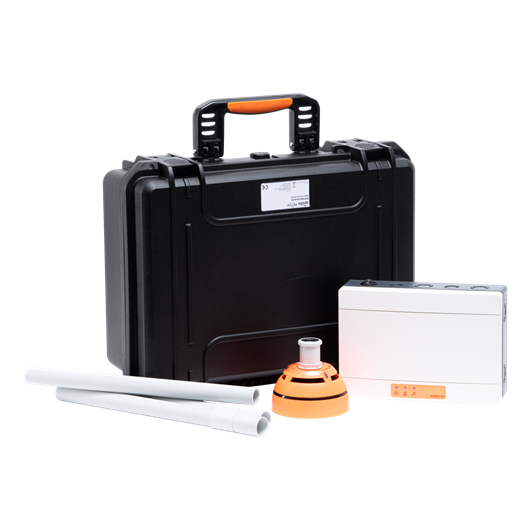
Apollo REACH Survey Kit Lite
£289.70 (inc VAT: £347.64)
Summary
The REACH Wireless Survey Kit Lite is a portable and battery-powered toolkit designed for surveying the signal strength of the REACH Wireless system prior to installation. This kit allows users to test potential installation locations by measuring the signal strength between the field device and the network host device, ensuring optimal placement for reliable operation.
Features
- Communication range of 100 m in open space
- 22 pairs of field device radio frequency channels
- Radiated power of 14 dBm (25 mW)
- Battery type for field device: 2x VARTA CR123A Lithium 3 V, 1250mAh
- Battery type for network host device: 4x VARTA CR123A Lithium 3 V, 1250mAh
- Operating temperature range of -10°C to +55°C
- Maximum relative humidity of 95% (non-condensing)
- Dimensions of 136 mm diameter x 96 mm height x 57 mm depth
- Weight of 270 g including base and batteries
Video
Transcription
“Hi. Today, we’re going to be looking at the reach wireless survey process. To prepare the survey kit, first remove the front cover of the survey kit hub. Insert 4 CR123 batteries as shown. Polarity is indicated on the PCBA.
Next, flick the power switch to the on position. The screen should show the Reach Wireless logo. Press the enter button to continue. This is a digital representation of the hub screen. Survey is used for the point to point survey.
Scan should be performed before the point to point survey. It will let you know which RF channels are congested so that you can avoid them. Settings is only used to pair and unpair the mock detector device. The first step should be to scan. It’s an important first step before proceeding with the survey.
Once initiated, it will scan all available RF channels for congestion and noise for approximately 5 seconds per channel. The process takes around 4 minutes to complete. Values shown here are for demonstration purposes only. Once complete, a results table will be displayed with each RF channel listed in order of preference. This should be recorded on the survey sheet for later as this will be used if installing multiple hubs.
You can download the sheet on the Apollo website. To begin the survey, select survey from the main menu. Select the best RF channel number you found during the background scan. Once set, select start survey. You will be asked to toggle device switch.
This prepares the mock detector with the RF channel to survey. To do this, remove the detector from the base. Then, remove the battery cover and install the included CR 123 batteries. Now, follow the on screen instructions to toggle the device switch. Once the device is powered on and paired to the hub, the hub should display a live readout of signal strength in dBm.
This is an example of what the LEDs on the detector look like when they’re flashing. The LED readouts indicate suitability for a product to be installed in the location being tested. Positive results are a green quick flash and negative results are a red long flash. Results are often followed by a one second blank. The exception is an extremely bad result to indicate range limit.
Once this is exceeded the LED will no longer flash until it comes back into range. Devices that range from marginal to extremely bad signal quality are not recommended for installation. They are likely to lead to communication errors that require repeated transmissions and may reduce battery life. Results at each survey point should be recorded in the reach survey sheet which is available to download on the Apollo website. Once the survey is complete you should have a full set of results recorded in the reach survey sheet.
Survey sheet is suitable for digital and printed use. You can download it in the description box below. It is important to keep these for the site installation as you will need the RF channels hub and device locations during setup. When finishing the survey turn the hub off at the rocker switch and move the mock detector switch to prevent devices having low or no power for the next survey. Thanks for watching.”
Specifications
- Product Name : REACH Wireless Survey Kit Lite
- Part Number : RW1800-060APO
- Battery Type (Field Device) : 2x VARTA CR123A Lithium 3 V, 1250mAh
- Battery Type (Network Host Device) : 4x VARTA CR123A Lithium 3 V, 1250mAh
- Operating Temperature : -10°C To +55°C
- Maximum Relative Humidity : 95%
- IP Rating : IP 65
- Dimensions : 136 Mm Diameter X 96 Mm Height X 57 Mm Depth
- Weight : 270 G
Downloads
- Datasheet (Adobe PDF)
Additional information
| Weight | 1 kg |
|---|---|
| System Type | |
| Device Type | |
| Colour |